Export Manager
The Export Manager facilitates Asset Discovery in restricted, offline or isolated environments where direct access to the ChangeGear Service is not available. This feature allows you to export and manually replace configuration files that are essential for discovering and classifying assets in those environments. By providing standardized classification rules and data models, the CMDB remains accurate and up-to-date, preventing gaps in asset data.
The Export Manager serves two main purposes:
-
Allows the Asset Discovery tool to function independently ensuring continued device discovery and classification.
-
Exports centralized classification rules and data models; users can ensure consistent asset tracking and data collection across different environments. By exporting and placing these files in the appropriate directories, administrators ensure that the ADE tool executes effective asset discovery, classifying assets accurately and keeping the CMDB updated in isolated setups.
Configurations for Export
-
SNMP Classifications - This file (SNMPTypeClassifierRules.xml) contains classification rules allowing ADE to classify networked assets based on their SNMP information.
-
Scan Data Models - This zip file contains scan data models that define the data sources used to collect details from each type of device during discovery. It includes attributes like device type, manufacturer, firmware, and other relevant information.
-
User Defined Resource Types - This exports definitions for custom resource types, ensuring these configurations are applied to offline environments.
To Get Started with the Export Manager:
-
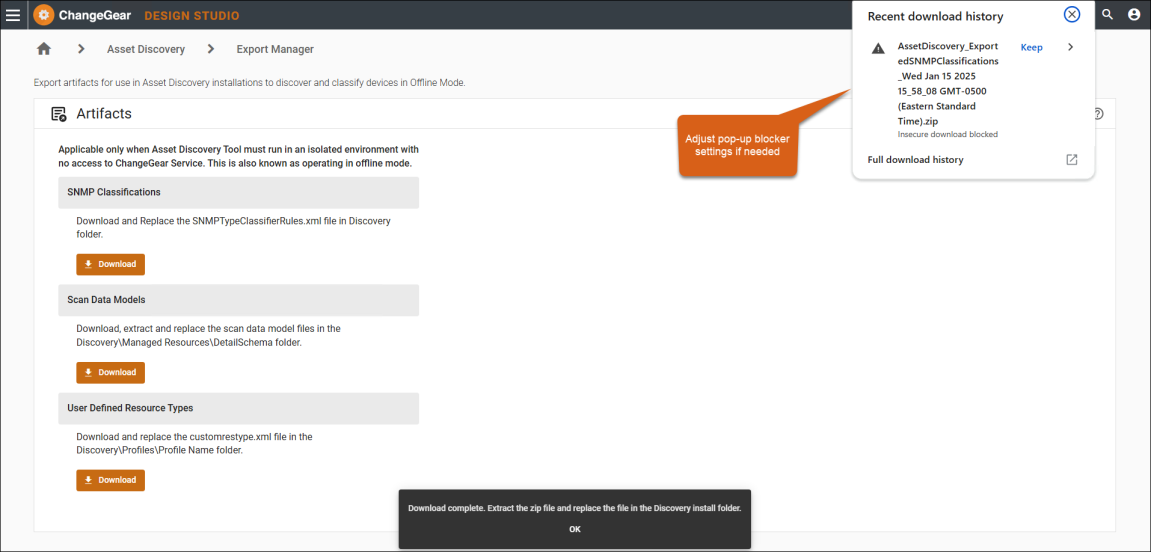
In ChangeGear Administration, navigate to Design Studio > Asset Discovery > Export Manager.
-
Click Download for each file you need (e.g., SNMP Classifications, Scan Data Models).
-
Click OK in the Download complete dialog, then extract the contents of the zip folder.
Important: Ensure that your browser's pop-up blocker settings are adjusted to allow downloads.
-
Replace the existing files in the directory of your offline environment.
-
SNMP Classifications - replace the SNMPTypeClassifierRules.xml file in the Discovery folder.
-
Scan Data Models - extract and replace the files in Discovery\Managed Resources\DetailSchema.
-
User Defined Resource Types - replace the customrestype.xml file in Discovery\Profiles\Profile Name.
-
The ADE Tool is ready to operate in Offline Mode, performing asset discovery and classification as configured.